 LockFrame
Your lock screen becomes
a frame for family photos
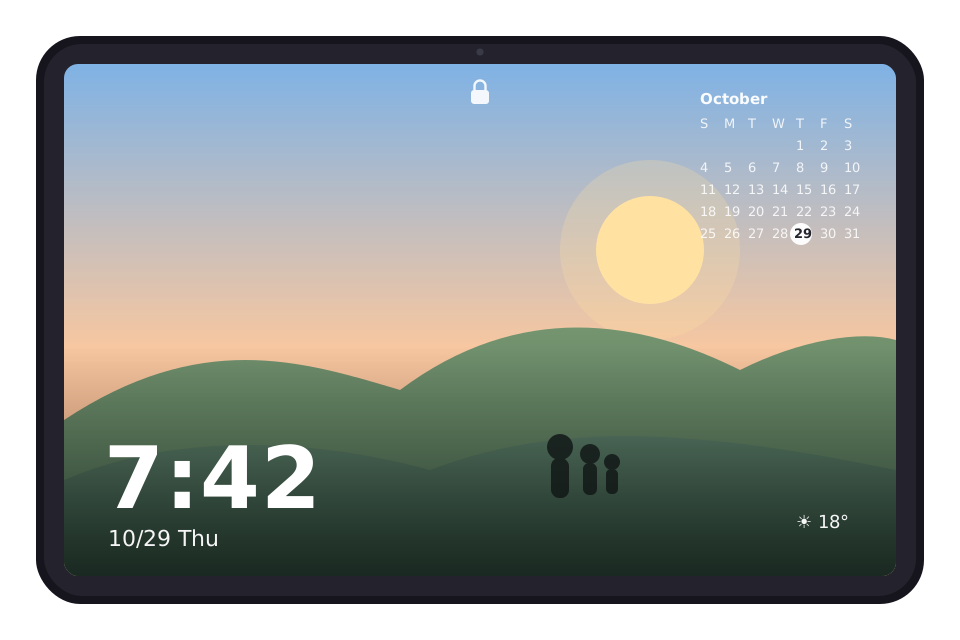
Turn on the screen and your photos start playing, with no need to unlock. The tablet on your shelf becomes a photo frame that brings back memories every day.
- Never unlocks your device
- No sign-up
- Photos stay on your device
Three steps to a photo frame you can just leave out
Set it up once. After that, your photos play every time the screen turns on.
Choose your photos
Pick from Google Photos, or point it at a folder on your device, Google Drive or your NAS.
Show them on the lock screen
Turn on "Show when the screen turns on". It also works as a screen saver or as your lock screen wallpaper.
Just leave it out
Press the power button and the slideshow starts without unlocking. Close it and you're back on your usual lock screen.
From collecting photos to choosing and showing them
Built to stay interesting even when it's always on, with care in how photos are chosen and shown.
Photos from many places
- Google Photos (the ones you pick)
- Device folders and Google Drive
- NAS and PCs (SMB, WebDAV)
- Google Photos shared links
- "Share" from other apps
"Smart" ordering
- More of your best shots and smiles
- Memories from this day in past years
- Newly added photos first
- Bursts of similar shots thinned out
Right on the lock screen
- Shows when the screen turns on, without unlocking
- Screen saver (while charging, for example)
- Rotating lock screen wallpaper
Clock and calendar
- Analog or digital clock and date
- This month's calendar with holidays
- Upcoming events
- Weather and photo location (off by default)
Gentle at night
- Night mode dims the screen
- Or show only the clock at night
- Shifts slightly to prevent burn-in
Videos too
- Short videos play between photos
- Can play muted
- Long videos move on partway
Your photos stay on your device
We don't run any server that stores your photos, and there's no account to create.
Free to use, Plus when you want more
For the 7 days after you install, every feature works free, the same as Plus. After that, the app stays free to use with some limits.
Everything is free for your first 7 days. For 7 days after installing, try every Plus feature, including unlimited photos, weather and events. You're never charged automatically.
- Up to 300 photos and videos in the slideshow
- Import from Google Photos, folders and Drive
- Lock screen and screen saver
- Clock, date and this month's calendar
- Smart ordering and night mode
- Unlimited photos and videos
- Automatic import from NAS and shared links
- Weather, photo location and upcoming events
- Rotating lock screen wallpaper
- Everything in Free
Prices are in USD; local prices may vary by country. Monthly and yearly plans renew automatically and can be cancelled anytime on Google Play. The one-time purchase is paid once and lasts forever.
Frequently asked questions
Does it unlock my device?
No. The slideshow is shown on top of the lock screen, and closing it brings you back to your usual lock screen. Your home screen and other apps still need you to unlock.
Will it drain my battery?
It only runs while the screen is on, so it uses almost no battery while the screen is off. If you keep it on all the time, we recommend keeping the device charging. You can also set when the screen turns off, or show it only while charging.
Which devices are supported?
Android tablets and phones running Android 10 or later. It's designed with a tablet on a shelf or in the kitchen in mind. iPhone and iPad are not supported.
What happens after the free 7 days?
You're never charged automatically. The app switches to the free plan, and some features are limited, such as showing up to 300 photos and videos in the slideshow. To keep every feature, subscribe to Plus.
How do I cancel?
In the Google Play Store app, tap your profile icon → Payments & subscriptions → Subscriptions, choose LockFrame Plus and cancel. You keep the Plus features until the end of the current period.
Where are my photos stored?
Only inside this app on your device. They're never sent to our servers. Uninstalling the app removes the imported copies (your originals in Google Photos and elsewhere are not touched).
Can I import a whole Google Photos album?
Because of how Google's picker works, you select photos to import (up to 2,000 at a time). To automatically pick up photos added to an album later, you can use a Google Photos shared link (an experimental feature).